

Description
Quick SSH/RDP Access for AWS EC2
Overview
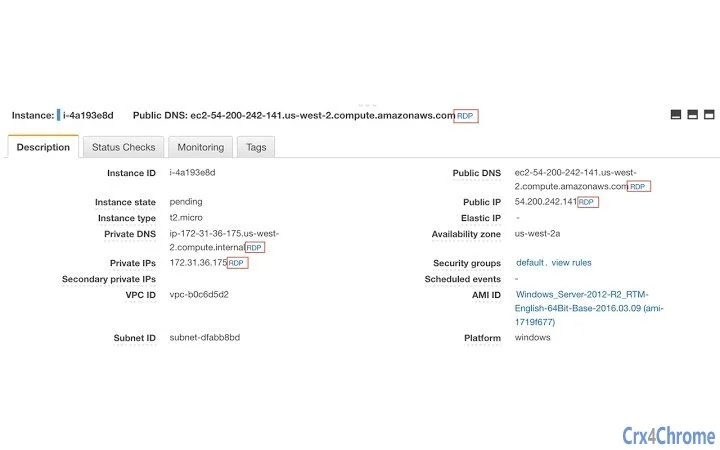
The software enhances the AWS EC2 Console by adding SSH and RDP connection links to six key locations: Private DNS, Public DNS, Private IP, Public IP, Elastic IP, and the top row of instance details. This integration streamlines remote access for users managing virtual servers in the cloud. Designed for developers, DevOps engineers, and cloud administrators, the tool eliminates the need to manually copy and format connection strings. By embedding direct access options within the console interface, it reduces workflow friction and minimizes human error during remote sessions. The tool is particularly useful in environments where frequent server access is required, such as development, testing, or production support. Its lightweight nature ensures minimal impact on browser performance. The developer, Nate Fox, has made the full source code publicly available on GitHub, promoting transparency and community-driven improvements. This open approach supports trust and enables users to audit or extend functionality as needed. The software does not require installation beyond browser extension setup, aligning with modern cloud-first workflows.
Key Features & Capabilities
- Direct SSH/RDP Links – Instantly connect to EC2 instances using SSH or RDP protocols from six key locations in the console.
- Context-Aware Integration – Automatically detects instance type and selects the appropriate connection method based on available details.
- Multi-Platform Support – Compatible with both Windows and Mac operating systems via supported browsers.
- Open Source Transparency – Full source code available on GitHub, allowing developers to inspect, modify, or contribute.
- Lightweight Design – Minimal footprint of 1.2 MB ensures fast loading and low resource usage.
These features are ideal for developers managing multiple EC2 instances who need to switch between environments quickly. For example, a DevOps engineer can click a single link to initiate an SSH session to a staging server using its public DNS, without copying or pasting commands. Similarly, a system administrator can use RDP to access a Windows-based instance directly from the console’s Elastic IP field. The tool reduces repetitive tasks and enhances consistency across teams. Since the functionality is embedded in the browser interface, it integrates seamlessly with existing AWS workflows. The open-source model encourages collaboration and long-term sustainability. No additional configuration is required beyond installing the extension, making it accessible even to users with limited technical expertise.
User Interface, Workflow & Performance
The software operates as a browser extension, integrating directly into the AWS EC2 Console interface. It adds clickable links adjacent to relevant instance details without altering the original layout. Navigation remains intuitive, with no additional menus or settings required. Users can access SSH or RDP connections with a single click, minimizing interaction steps. The interface is clean and unobtrusive, avoiding visual clutter while delivering essential functionality. Workflow efficiency is significantly improved, especially in high-frequency use cases such as debugging, deployment verification, or server maintenance. The developer did not specify resource usage details, but the 1.2 MB size suggests minimal CPU and RAM consumption. Performance observations are based on general software behavior patterns. Stability is expected to be high, given the tool’s focused scope and open-source nature. No known conflicts with major browsers were reported. The extension runs entirely within the browser context, reducing the risk of system-level interference. Updates are managed through the browser’s extension store, ensuring users receive the latest version automatically.
Compatibility & System Requirements
The software is designed for use with Windows and Mac operating systems. It functions as a browser extension, meaning compatibility depends on the supported browsers for each platform. The extension has a file size of 1.2 MB, which is typical for lightweight browser tools. Exact system requirements were not listed, but the tool is expected to run on modern systems with standard web browser capabilities. The developer did not provide additional system requirements. Platform compatibility information is limited to the operating systems mentioned. Users should ensure their browser is up to date to maintain optimal functionality. The extension is compatible with the AWS EC2 Console, which requires a stable internet connection and valid AWS credentials. No offline functionality was specified. The tool does not require administrative privileges to install or run, making it accessible in shared or restricted environments.
Pros and Cons
Pros
- Direct SSH and RDP access from multiple locations in the AWS console
- Open source with full transparency via GitHub
- Lightweight and fast, with minimal resource usage
- Easy installation and setup via browser extension
- Supports both Windows and Mac platforms
Cons
- No built-in configuration options or customization
- Dependent on browser and AWS console stability
- Does not support additional cloud providers beyond AWS
- No offline access or local caching
- Functionality limited to EC2 instances only
FAQ Section
Is this tool compatible with all browsers?
The software is designed to work with major browsers that support extensions. Specific browser compatibility details were not provided by the developer.
Is the software safe to use with my AWS account?
The tool operates within the browser context and does not store or transmit sensitive data. It only generates connection links based on visible console information. Users should always verify the source of the extension before installation.
How often are updates released?
Updates are managed through the browser’s extension store. The developer has not specified a release schedule, but the open-source model allows for community contributions and timely patches.
What license type does the software use?
The source code is publicly available on GitHub. The specific license type was not mentioned in the provided information.
Can I use this tool offline?
No, the tool requires an active internet connection and access to the AWS EC2 Console. It does not support offline usage or local data storage.
Final Thoughts + CTA
Quick SSH/RDP Access for AWS EC2 delivers a focused, reliable solution for developers and cloud engineers who frequently connect to EC2 instances. Its seamless integration into the AWS console eliminates repetitive tasks and enhances productivity. The open-source model adds trust and long-term viability, while the lightweight design ensures smooth performance across systems. While it lacks advanced configuration options, its simplicity is a strength for users seeking immediate utility. The tool is especially valuable in fast-paced development and operations environments where time efficiency is critical. For anyone managing AWS EC2 instances, this extension offers a practical, no-frills enhancement to daily workflows. Download Quick SSH/RDP Access for AWS EC2 now.
Guides & Tutorials for AWS SSH RDP Links Extension for Chrome
How to install AWS SSH RDP Links Extension for Chrome
- Click the Preview / Download button above.
- Once redirected, accept the terms and click Install.
- Wait for the AWS SSH RDP Links Extension for Chrome download to finish on your device.
How to use AWS SSH RDP Links Extension for Chrome
This software is primarily used for its core features described above. Open the app after installation to explore its capabilities.
User Reviews for AWS SSH RDP Links Extension for Chrome 0
No reviews found





